Top N per group in Power Query, with ties handled
Recipes · By Tahir Nas · Examples run in our simulator · Published · Updated
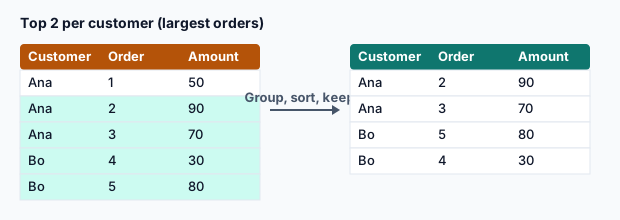
Top 2 products per region
let
    Sales = #table({"Region", "Product", "Units"}, {
        {"North", "Kite", 40}, {"North", "Reel", 25}, {"North", "Line", 25}, {"North", "Hook", 10},
        {"South", "Reel", 30}, {"South", "Kite", 12}
    }),
    Top = Table.Group(Sales, {"Region"}, {{"Rows", each Table.FirstN(Table.Sort(_, {{"Units", Order.Descending}, {"Product", Order.Ascending}}), 2), type table}}),
    Expanded = Table.ExpandTableColumn(Top, "Rows", {"Product", "Units"})
in
    Expanded
Result
| Region | Product | Units |
|---|---|---|
| North | Kite | 40 |
| North | Line | 25 |
| South | Reel | 30 |
| South | Kite | 12 |
Output produced by the Power Query Exercises simulator, an independent implementation of a documented subset of M.
Keep everyone who ties
If tied products should share the place, find the Nth-highest value in each group and keep every row at or above it:
let
    Sales = #table({"Region", "Product", "Units"}, {
        {"North", "Kite", 40}, {"North", "Reel", 25}, {"North", "Line", 25}, {"North", "Hook", 10},
        {"South", "Reel", 30}, {"South", "Kite", 12}
    }),
    Top = Table.Group(Sales, {"Region"}, {{"Rows", (g) =>
        let
            Threshold = List.Min(List.MaxN(g[Units], 2))
        in
            Table.SelectRows(g, each [Units] >= Threshold), type table}}),
    Expanded = Table.ExpandTableColumn(Top, "Rows", {"Product", "Units"})
in
    Expanded
Result
| Region | Product | Units |
|---|---|---|
| North | Kite | 40 |
| North | Reel | 25 |
| North | Line | 25 |
| South | Reel | 30 |
| South | Kite | 12 |
Output produced by the Power Query Exercises simulator, an independent implementation of a documented subset of M.
List.MaxN takes the N largest values in descending order, so List.Min(List.MaxN(values, 2)) is the second-largest value even when the largest appears twice: for {40, 40, 25} it returns 40, and both 40s are kept. Decide whether that's the rule you want: 'top two values' and 'top two rows' differ exactly when there are ties.
Choose the rule before building
| Rule | Rows per group | Use |
|---|---|---|
| Exactly N, tie-breaker decides | Always N (or fewer) | Fixed-size lists, leaderboards with a clear tie rule |
| N places, ties share | N or more | 'Top sellers' where excluding a tie would be unfair |
The same pattern answers 'bottom N' questions: sort ascending instead of descending, or use List.MinN for the threshold version. It also works with a calculated measure, such as revenue = units × price, as long as you add that column before grouping.
Expanding only the columns you need keeps the result tidy. The group key (Region) is already on the outer table, so don't expand it again from the nested rows.
Practise it in the simulator
Each task opens the exact exercise in the browser workspace and is checked against fresh data, not just the example. Free tasks need no account.
Related pages
Lessons
More resources
Function reference
Sources
Microsoft's official documentation for the features and functions used on this page.
- Grouping or summarizing rows (Concept, Microsoft Learn)
- Add an index column (Concept, Microsoft Learn)
- Table.Group (Function reference, Microsoft Learn)
- Table.FirstN (Function reference, Microsoft Learn)
- Table.Sort (Function reference, Microsoft Learn)
- Table.ExpandTableColumn (Function reference, Microsoft Learn)
- List.Min (Function reference, Microsoft Learn)
- List.MaxN (Function reference, Microsoft Learn)
- Table.SelectRows (Function reference, Microsoft Learn)
Power Query Exercises is an independent educational platform and is not affiliated with, endorsed by, sponsored by, or approved by Microsoft Corporation. All third-party trademarks belong to their respective owners.