Running totals and cumulative sums in Power Query
Recipes · By Tahir Nas · Examples run in our simulator · Published · Updated
Should it be in Power Query?
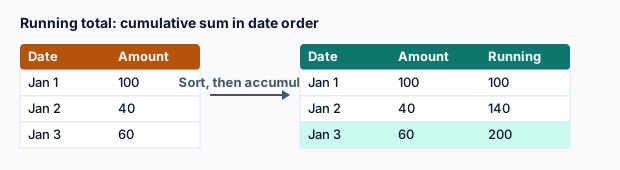
In Power BI, a running total that should respond to slicers belongs in a DAX measure. Compute it in Power Query when the order and grouping are fixed: a ledger balance, cumulative units produced, a stock position by date.
The simple version (small tables)
Sort, add an index, and sum the first N values for each row. Easy to read, but each row re-sums everything before it, so the work grows with the square of the row count:
let
    Days = #table({"Day", "Units"}, {{1, 5}, {2, 3}, {3, 0}, {4, 7}}),
    Indexed = Table.AddIndexColumn(Days, "i", 1, 1, Int64.Type),
    Running = Table.AddColumn(Indexed, "Cumulative", each List.Sum(List.FirstN(Indexed[Units], [i])), type number)
in
    Table.RemoveColumns(Running, {"i"})
Result
| Day | Units | Cumulative |
|---|---|---|
| 1 | 5 | 5 |
| 2 | 3 | 8 |
| 3 | 0 | 8 |
| 4 | 7 | 15 |
Output produced by the Power Query Exercises simulator, an independent implementation of a documented subset of M.
The scalable version
Build the whole cumulative list in one pass with List.Accumulate, then put it next to the original columns with Table.FromColumns:
let
    Days = Table.Sort(#table({"Day", "Units"}, {{2, 3}, {1, 5}, {4, 7}, {3, 0}}), {{"Day", Order.Ascending}}),
    Cumulative = List.Accumulate(Days[Units], {}, (acc, u) => acc & {(if List.IsEmpty(acc) then 0 else List.Last(acc)) + u}),
    Result = Table.FromColumns(Table.ToColumns(Days) & {Cumulative}, Table.ColumnNames(Days) & {"Cumulative"})
in
    Result
Result
| Day | Units | Cumulative |
|---|---|---|
| 1 | 5 | 5 |
| 2 | 3 | 8 |
| 3 | 0 | 8 |
| 4 | 7 | 15 |
Output produced by the Power Query Exercises simulator, an independent implementation of a documented subset of M.
Running total per group
Wrap the same logic in a function and apply it to each group's rows with Group By:
let
    AddRunning = (t as table) as table =>
        let
            Sorted = Table.Sort(t, {{"Day", Order.Ascending}}),
            Cum = List.Accumulate(Sorted[Units], {}, (acc, u) => acc & {(if List.IsEmpty(acc) then 0 else List.Last(acc)) + u})
        in
            Table.FromColumns(Table.ToColumns(Sorted) & {Cum}, Table.ColumnNames(Sorted) & {"Cumulative"}),
    Output = #table({"Line", "Day", "Units"}, {{"A", 1, 5}, {"B", 1, 2}, {"A", 2, 3}, {"B", 2, 4}}),
    Grouped = Table.Group(Output, {"Line"}, {{"Rows", each AddRunning(Table.RemoveColumns(_, {"Line"})), type table}}),
    Expanded = Table.ExpandTableColumn(Grouped, "Rows", {"Day", "Units", "Cumulative"})
in
    Expanded
Result
| Line | Day | Units | Cumulative |
|---|---|---|---|
| A | 1 | 5 | 5 |
| A | 2 | 3 | 8 |
| B | 1 | 2 | 2 |
| B | 2 | 4 | 6 |
Output produced by the Power Query Exercises simulator, an independent implementation of a documented subset of M.
Whichever method you use, check the last cumulative value against a plain total: List.Last(Cumulative) = List.Sum(Days[Units]). If they differ, a null or a sort problem is hiding in the data.
For very long tables, List.Generate builds the same list with less copying than List.Accumulate's acc & {…}, at the cost of slightly harder code. Start with the version you can read, and optimise only when refresh time shows you need to.
Practise it in the simulator
Each task opens the exact exercise in the browser workspace and is checked against fresh data, not just the example. These tasks are part of Pro.
Related pages
Lessons
Sources
Microsoft's official documentation for the features and functions used on this page.
- Add an index column (Concept, Microsoft Learn)
- List functions (Concept, Microsoft Learn)
- Grouping or summarizing rows (Concept, Microsoft Learn)
- Table.AddIndexColumn (Function reference, Microsoft Learn)
- Table.AddColumn (Function reference, Microsoft Learn)
- List.Sum (Function reference, Microsoft Learn)
- List.FirstN (Function reference, Microsoft Learn)
- Table.RemoveColumns (Function reference, Microsoft Learn)
- Table.Sort (Function reference, Microsoft Learn)
- List.Accumulate (Function reference, Microsoft Learn)
- List.IsEmpty (Function reference, Microsoft Learn)
Power Query Exercises is an independent educational platform and is not affiliated with, endorsed by, sponsored by, or approved by Microsoft Corporation. All third-party trademarks belong to their respective owners.