Group By recipes: count if, concatenate, first and last, top value
Recipes · By Tahir Nas · Examples run in our simulator · Published · Updated
The Group By dialog offers sum, average, min, max, count and all rows. The formula bar offers everything else. In each aggregation, _ is the group's table and [Column] is that column as a list.
let
    Tickets = #table({"Agent", "Opened", "Priority", "Tag"}, {
        {"Ana", #date(2026, 10, 1), "High", "billing"},
        {"Ana", #date(2026, 10, 9), "Low", "login"},
        {"Ana", #date(2026, 10, 4), "High", "billing"},
        {"Ben", #date(2026, 10, 2), "Low", "login"},
        {"Ben", #date(2026, 10, 7), "Low", "refund"}
    }),
    Summary = Table.Group(Tickets, {"Agent"}, {
        {"High priority", each List.Count(List.Select([Priority], each _ = "High")), Int64.Type},
        {"Tags", each Text.Combine(List.Sort(List.Distinct([Tag])), ", "), type text},
        {"First", each List.Min([Opened]), type date},
        {"Last", each List.Max([Opened]), type date},
        {"Most common tag", each List.Mode([Tag]), type text}
    })
in
    Summary
Result
| Agent | High priority | Tags | First | Last | Most common tag |
|---|---|---|---|---|---|
| Ana | 2 | billing, login | 2026-10-01 | 2026-10-09 | billing |
| Ben | 0 | login, refund | 2026-10-02 | 2026-10-07 | login |
Output produced by the Power Query Exercises simulator, an independent implementation of a documented subset of M.
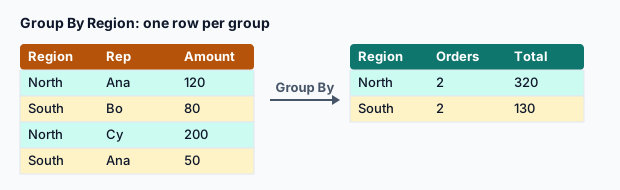
The recipes, one line each
| Question | Aggregation |
|---|---|
| How many rows meet a condition? | List.Count(List.Select([Priority], each _ = "High")) |
| Which distinct values, as text? | Text.Combine(List.Sort(List.Distinct([Tag])), ", ") |
| First / last date? | List.Min([Opened]), List.Max([Opened]) |
| Most frequent value? | List.Mode([Tag]) |
| How many distinct values? | List.Count(List.Distinct([Customer])) |
| Share of rows meeting a condition? | List.Count(List.Select(...)) / Table.RowCount(_) |
| The whole row with the max value? | Table.Max(_, "Amount") (a record; expand it) |
Each aggregation is independent, so you can mix them freely in one Group By step. That keeps the grain obvious: one row per agent, with every measure computed over the same group of rows.
For conditional counts, you can also filter before grouping, but then groups with no matching rows disappear entirely. Counting with List.Select inside the aggregation keeps every group and shows 0, as Ben's high-priority count does above.
The row with the latest date
let
    Tickets = #table({"Agent", "Opened", "Tag"}, {{"Ana", #date(2026, 10, 1), "billing"}, {"Ana", #date(2026, 10, 9), "login"}, {"Ben", #date(2026, 10, 7), "refund"}}),
    Latest = Table.Group(Tickets, {"Agent"}, {{"Row", each Table.Max(_, "Opened"), type record}}),
    Expanded = Table.ExpandRecordColumn(Latest, "Row", {"Opened", "Tag"}, {"Latest opened", "Latest tag"})
in
    Expanded
Result
| Agent | Latest opened | Latest tag |
|---|---|---|
| Ana | 2026-10-09 | login |
| Ben | 2026-10-07 | refund |
Output produced by the Power Query Exercises simulator, an independent implementation of a documented subset of M.
If an aggregation fails for one group (for example List.Mode on a group with only nulls), the error sits in that group's cell. Wrap fragile aggregations in try … otherwise null so one odd group doesn't block the whole summary.
Practise it in the simulator
Each task opens the exact exercise in the browser workspace and is checked against fresh data, not just the example. These tasks are part of Pro.
- intermediate~8 minPro
Count distinct customers per product (kite shop)
For each product, count how many different customers ordered it.
- intermediate~8 minPro
Find each region's first and last order date (kite shop)
Group by Region with the earliest and latest OrderDate as real dates.
- intermediate~8 minPro
Summarise orders by region (kite shop)
Group by Region with order count, total quantity and average unit price, sorted by region.
Related pages
Lessons
More resources
Function reference
Sources
Microsoft's official documentation for the features and functions used on this page.
- Grouping or summarizing rows (Concept, Microsoft Learn)
- List functions (Concept, Microsoft Learn)
- Table.Group (Function reference, Microsoft Learn)
- List.Count (Function reference, Microsoft Learn)
- List.Select (Function reference, Microsoft Learn)
- Text.Combine (Function reference, Microsoft Learn)
- List.Sort (Function reference, Microsoft Learn)
- List.Distinct (Function reference, Microsoft Learn)
- List.Min (Function reference, Microsoft Learn)
- List.Max (Function reference, Microsoft Learn)
Power Query Exercises is an independent educational platform and is not affiliated with, endorsed by, sponsored by, or approved by Microsoft Corporation. All third-party trademarks belong to their respective owners.